WORDPRESS
MAINTENANCE SERVICES

WORDPRESS MAINTENANCE THAT KEEPS YOUR SITE UNDER CONTROL

Updates, backups, monitoring, and recurring technical issues should not become another job for your team. Webless handles ongoing WordPress care so your site stays maintained, recoverable, and easier to rely on.

Weekly Reports
0
DAILY BACKUPS
Uptime monitoring
0 /7
Security monitoring
0 /7
Emergency support
0 /7
WHAT YOU GET WITH WEBLESS MAINTENANCE

Reliable WordPress maintenance is a process, not a one-time update. We combine scheduled care, monitoring, backups, and support so recurring technical work stays visible and under control.

  • Monitoring: Availability, performance, and security signals are tracked so issues can be investigated.
  • Routine care: Updates, cleanup, backups, and eligible fixes are handled according to the selected plan.
  • Clear records: Weekly reports show what was completed and what needs attention.

Every plan comes with the same core protection and care. Higher tiers simply add more support time and e-commerce extras.

Every plan comes with:

Care and monitoring
Protection and recovery
Updates and stability
Support and content

OUR CLIENTS

CLIENT Reviews

Curated from our exceptional clients, these top reviews have been meticulously selected.

JUS***
Super reliable and efficient service. My website runs smoother than ever and I no longer worry about backups or updates.
TOM***
I’ve tried other maintenance services before, but this is the only one that feels truly hands-off. Everything just works.
KAI***
Quick response times, detailed reports, and peace of mind—everything I needed to focus on growing my business.
LIA***
Great experience! They handled all the technical tasks I used to stress over. Highly recommend their ongoing support.
JON***
My WooCommerce store has been much more stable and faster since switching to this maintenance plan.
EMI***
Consistent quality and top-notch support. It’s clear they care about keeping my site healthy and secure.

WORDPRESS MAINTENANCE REPORTS

A CLEAR WEEKLY MAINTENANCE REPORT

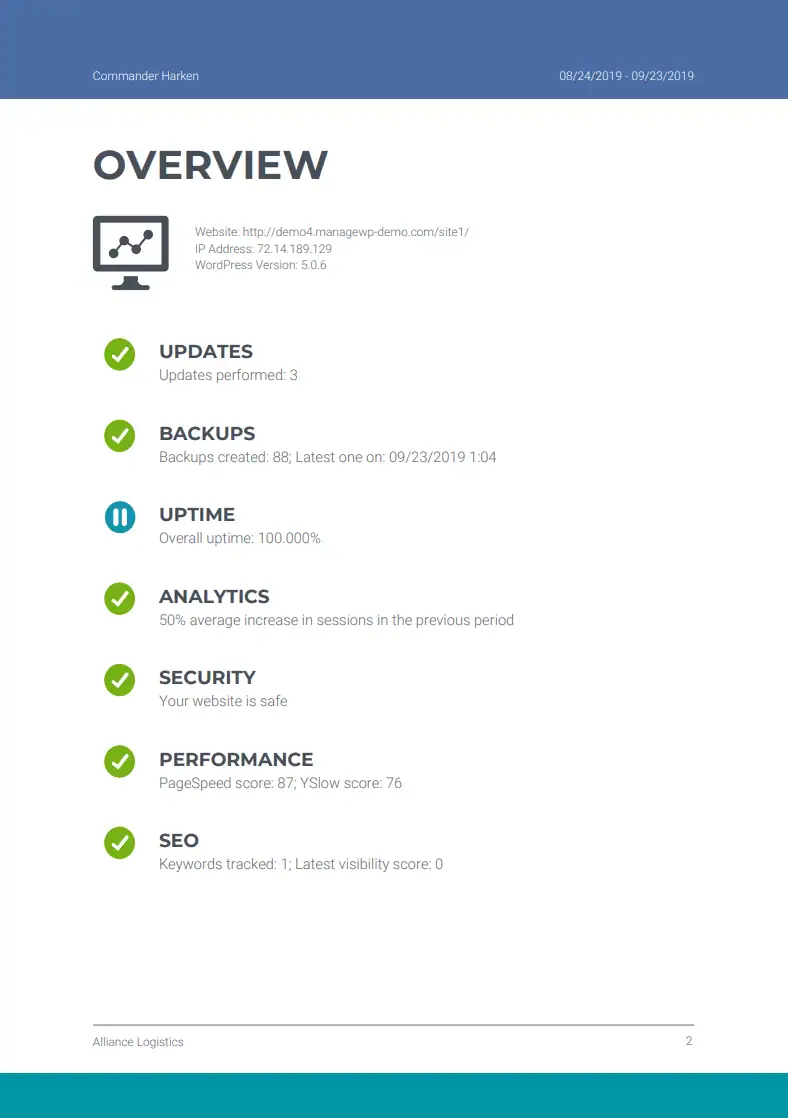
Weekly reports show completed maintenance work, monitoring results, backups, updates, and issues that need attention. You get a clear record without reading raw technical logs.

Summary reports

WEEKLY OVERVIEWS

Your weekly WordPress maintenance report brings the key work and monitoring results into one clear summary. See what was completed, whether backups and website checks ran as expected, and which items need a decision or follow-up.

  • WordPress core, plugin, and theme work completed
  • Backup activity and available recovery points
  • Website uptime, security, and performance status
  • Issues found and actions that need follow-up
  • A concise record you can review or share with your team

Use the overview to confirm ongoing WordPress maintenance is being handled without reading raw logs or checking several tools.

Summary reports

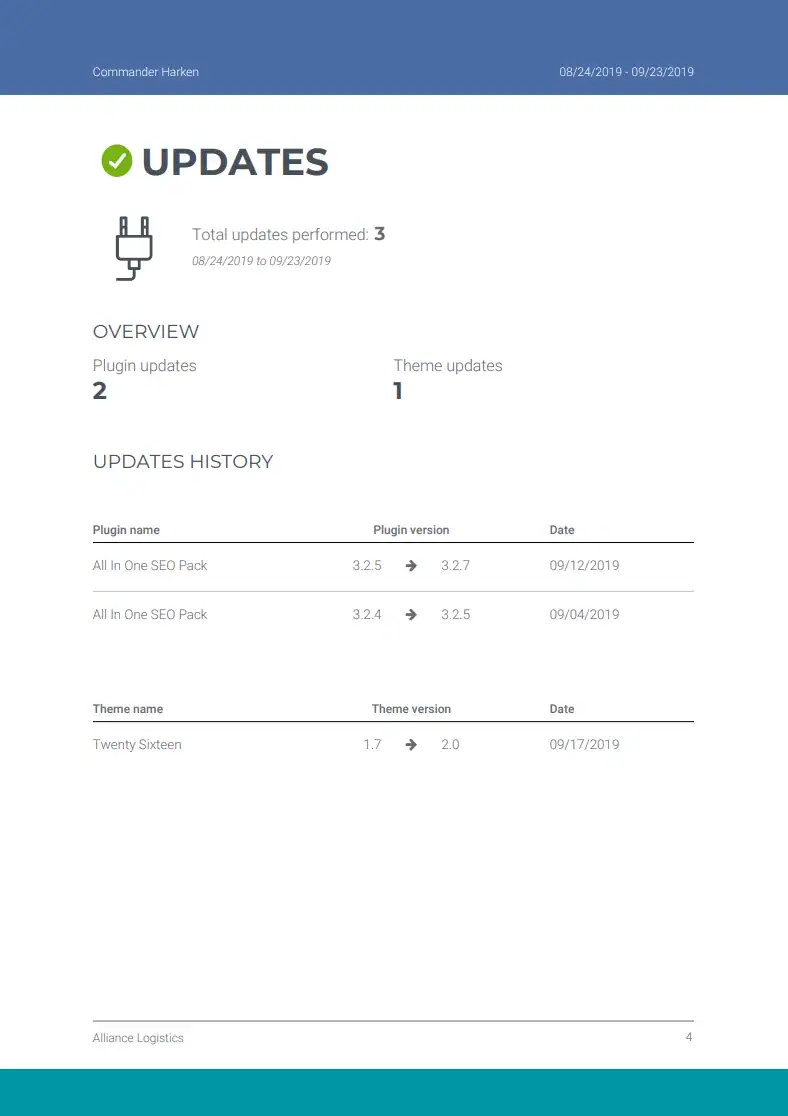
WEEKLY UPDATES

Your WordPress update report records the core, plugin, and theme updates handled during the maintenance period. It provides a practical change history and makes pending updates, compatibility concerns, or follow-up testing easier to understand.

  • WordPress core versions updated
  • Plugin and theme updates completed
  • Update dates and available version details
  • Updates held back for compatibility or review
  • Testing notes and recommended follow-up

For business and WooCommerce sites, this record helps you track routine software maintenance and understand changes that may affect functionality.

Summary reports

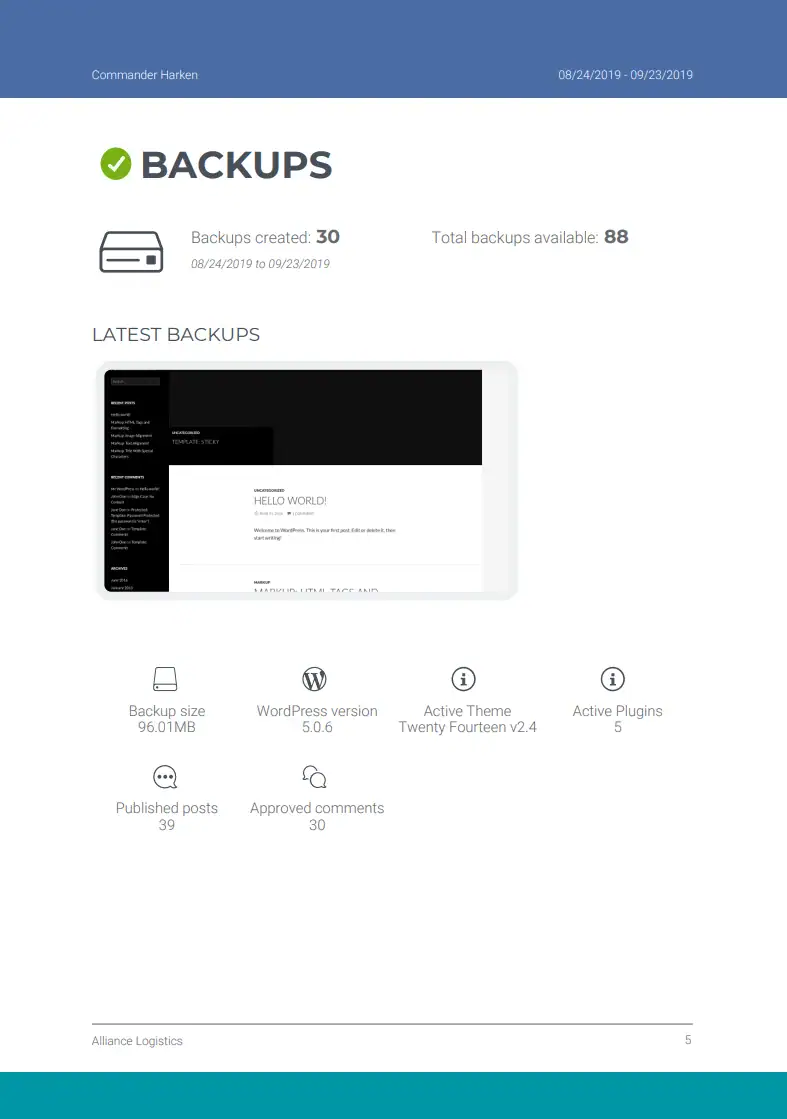
DAILY BACKUPS

Daily WordPress backup reporting confirms whether recent backups were recorded and shows the available recovery history before updates or unexpected issues. Instead of assuming a backup exists, you can review the evidence in one place.

  • Latest backup date and time
  • File and database backup status recorded by the system
  • Backup size and available website details
  • Recent recovery-point history
  • Missing, failed, or incomplete backups that need attention

This gives you a clearer view of website recovery readiness while keeping detailed backup logs out of your day-to-day workflow.

Summary reports

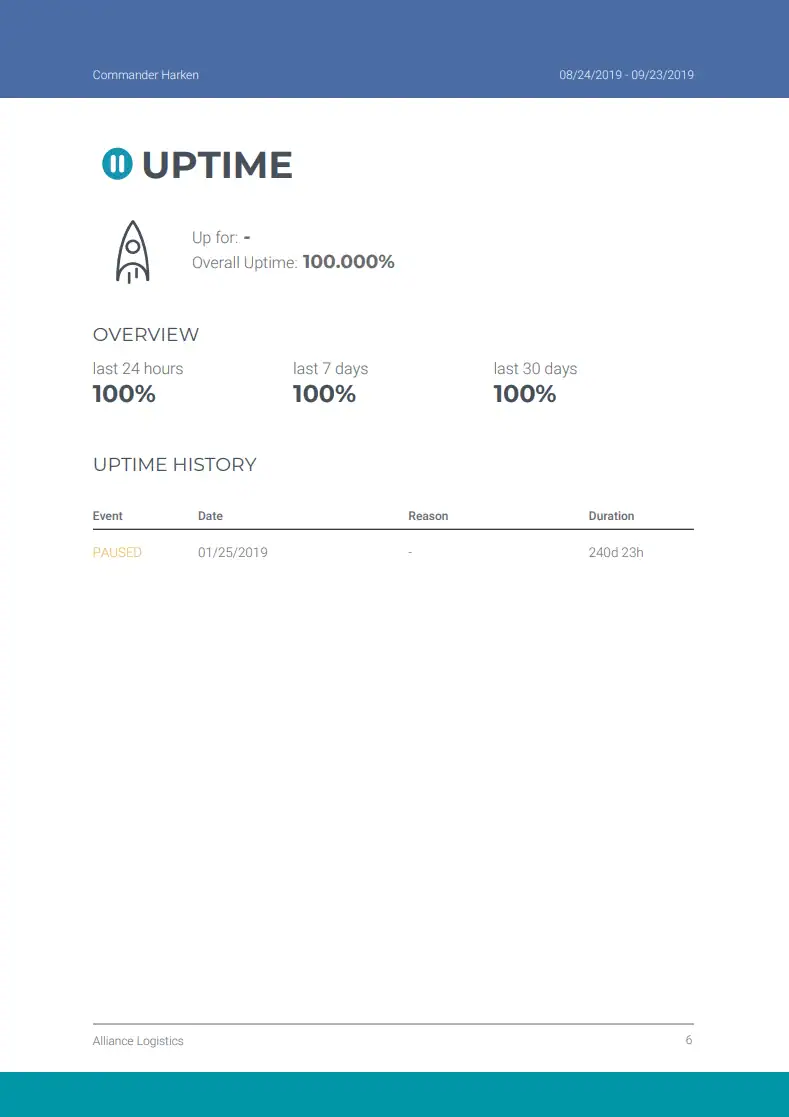
UPTIME MONITORING

Website uptime monitoring tracks whether your WordPress site remained available and records interruptions across the reporting period. The history helps separate an isolated outage from a recurring reliability problem that needs investigation.

  • Monitored website availability percentage
  • Recorded downtime events and timestamps
  • Incident duration and recovery time
  • Repeated availability patterns
  • Reliability issues that need technical follow-up

Consistent uptime reporting gives business and WooCommerce website owners a clearer record of availability without requiring them to watch the site manually.

Summary reports

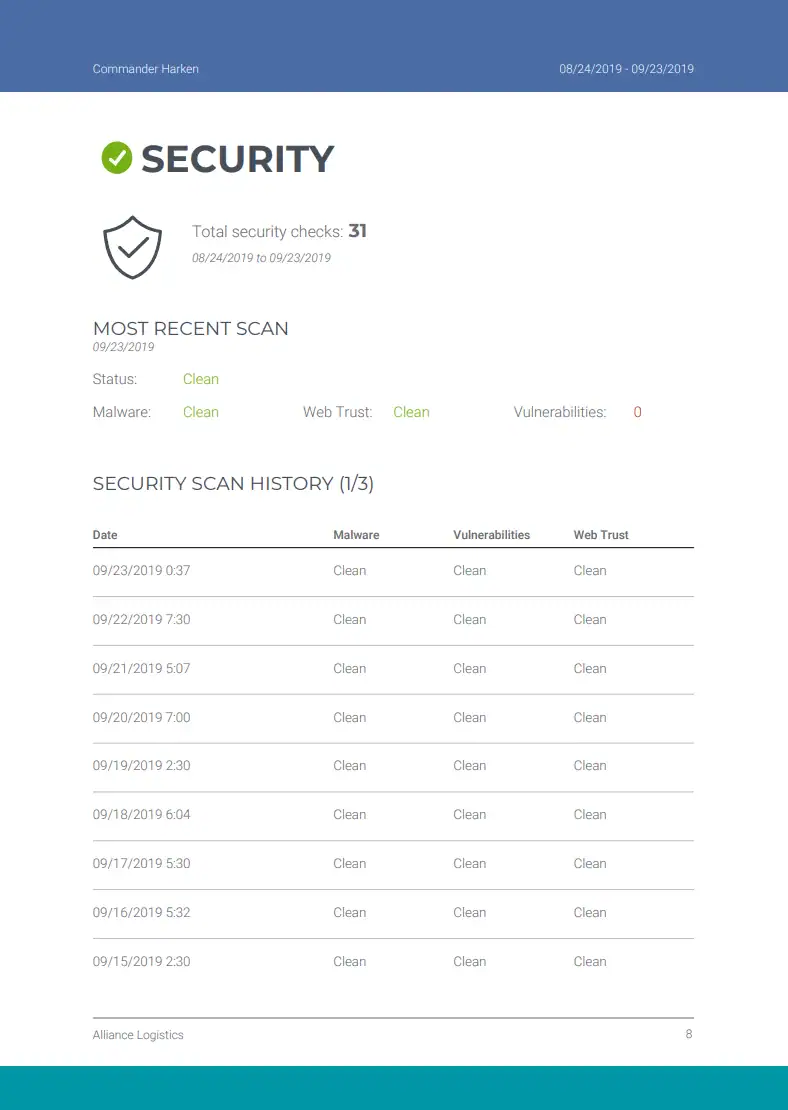
SECURITY MONITORING

WordPress security monitoring summarizes the automated malware and vulnerability checks recorded for your site. It helps surface warning signs early and shows when a result needs investigation, an update, or a separate security response.

  • Malware scan status and timestamps
  • Known WordPress, plugin, and theme vulnerability results
  • Warnings or findings recorded during the period
  • Security items resolved through routine maintenance
  • Risks that need investigation or specialist action

Monitoring provides preventive visibility. Active hacks, malware cleanup, and incident recovery require a separate WordPress security service.

Summary reports

PERFORMANCE MONITORING

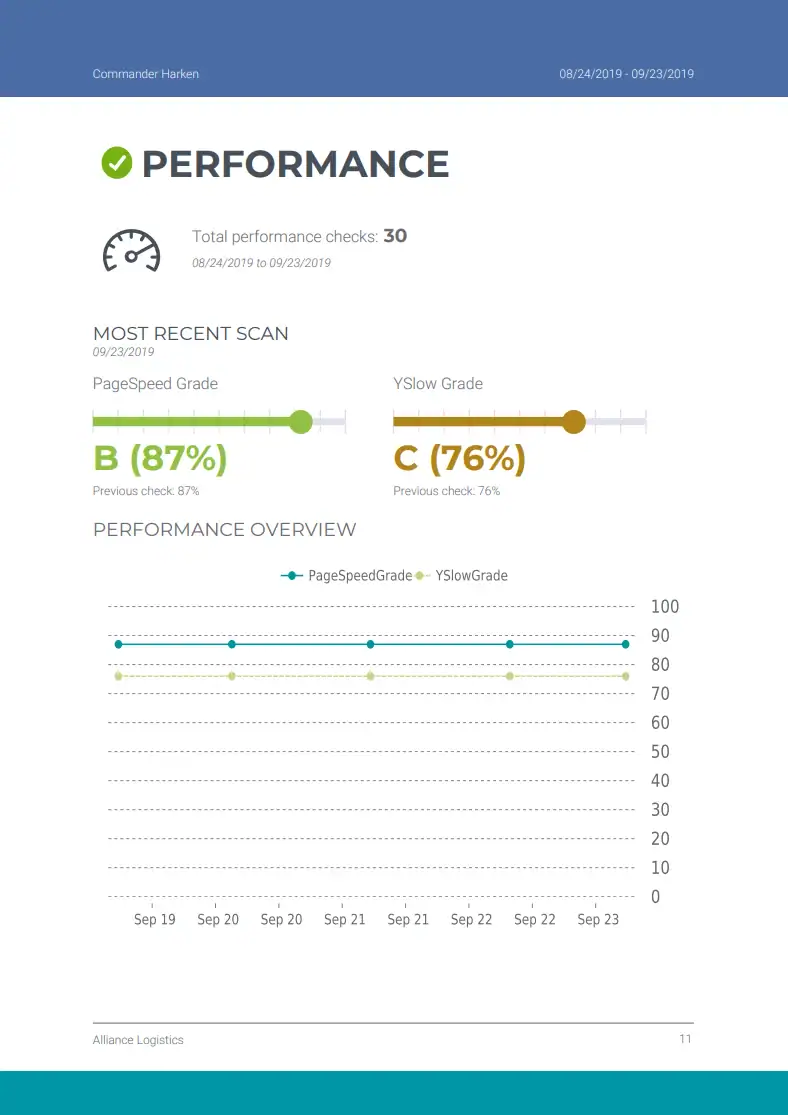
WordPress performance monitoring follows available speed measurements and loading trends so changes are easier to notice between reports. It helps identify when server response, page weight, caching, or frontend behavior may deserve closer investigation.

  • Recorded website performance measurements
  • Historical loading and score trends
  • Significant changes between reports
  • Recurring slowdowns or inconsistent results
  • Recommended performance checks or follow-up

The report provides ongoing visibility, while deeper Core Web Vitals or WordPress speed optimization can be scoped separately when a persistent issue appears.

TECHNICAL CARE WITHOUT GUESSWORK

Maintenance keeps routine WordPress work from piling up. We handle scheduled updates, backups, monitoring, cleanup, and eligible support tasks according to the selected plan, then document the work clearly.

Weekly Maintenance Reports

Receive a clear summary of completed updates, checks, monitoring results, and maintenance activity.

E-Commerce Support and Help

Support eligible WooCommerce product, inventory, payment, and store-functionality tasks within the selected plan.

WordPress, Plugin, and Theme Updates

Apply updates with compatibility awareness and verify that important website functions continue working afterward.

Website and Database Cleanup

Remove suitable temporary or unnecessary data and review database health without deleting information the site needs.

24/7 Performance Monitoring

Monitor meaningful performance changes so new slowdowns can be identified and investigated.

24/7 Uptime Monitoring

Track website availability and record downtime so repeated incidents and reliability problems are visible.

Emergency Support

Investigate urgent website issues according to the response channel and coverage included in the selected plan.

24/7 Security Monitoring

Monitor for relevant security concerns and investigate findings within the agreed maintenance scope.

Support and Content Edits

Request eligible content changes or technical support through the channel included with the selected plan.

Scheduled Off-Site Backups

Maintain restorable backups on the schedule and storage arrangement defined by the selected maintenance plan.

HOW IT WORKS

THREE STEPS TO GET STARTED

Choose the relevant service, share the website and requirements, and Webless will confirm the next steps before work begins.

Start with speed optimization, maintenance, development, or contact us when the request does not fit a standard option.

Share the website, goals, access requirements, and important constraints so the scope and next step are clear.

Webless carries out the agreed work, checks the relevant result, and provides the applicable report, review, or handover.

WORDPRESS MAINTENANCE & SUPPORT

CHOOSE THE MAINTENANCE PLAN THAT FITS YOUR SITE

Choose the level of monitoring, backup coverage, update care, and support time that matches your WordPress site. Each plan shows its exact inclusions before checkout.

  • Monitoring: Compare uptime, security, and performance coverage.
  • Backups and updates: Check the included backup schedule and maintenance scope.
  • Support: Match the included support time and priority to your site.

STARTUP PACKAGE

For small business sites and blogs that need reliable updates, backups and security without an in-house tech team.

ADVANCED PACKAGE

For growing businesses and smaller online stores that need extra performance care, e-commerce stability and more support time each month.

EXPERT PACKAGE

For complex sites and busy WooCommerce stores where downtime is expensive. Includes priority support, more hands-on optimization and advanced monitoring.

NOT SURE WHAT IS SLOWING YOUR SITE DOWN?

Request a WordPress Core Web Vitals report to see which loading, responsiveness, stability, and accessibility issues deserve attention first.

FAQ SECTION

Common Questions

Here are some of the most frequently asked questions we receive about our WordPress Maintenance Services.

Each plan includes a full suite of essential services to keep your WordPress website healthy. This includes weekly maintenance reports, core/theme/plugin updates, daily cloud backups, uptime monitoring, security scans, database cleanup, broken link monitoring, SMTP checks, and 24/7 monitoring. Depending on your selected package, you’ll also receive dedicated support hours and access to premium tools for performance, backups, and email delivery.

Yes. To perform maintenance tasks such as updates, backups, security monitoring, and error resolution, we require wp-admin login details with full administrator privileges. You may set up a temporary admin account if preferred. All credentials are handled with strict confidentiality and deleted securely upon request.
Yes. Our Expert Plan is specifically designed for larger, more dynamic websites, including WooCommerce stores. It includes more support hours, priority assistance, and eCommerce compatibility. We’re equipped to handle the added complexity of online stores, membership sites, and custom integrations.

All payments are processed securely through Stripe, one of the most trusted payment gateways available. You can choose a one-time 30-day payment or subscribe monthly. After checkout, you’ll receive access to your Stripe billing portal, where you can manage invoices, update payment details, or cancel at any time.

Yes, there are no long-term contracts or commitments. You can cancel your subscription directly from your account. Once canceled, your service will remain active until the end of the current 30-day billing period. You will not be billed again unless you resubscribe.

Due to the nature of this service, which involves time-based and task-based technical work, we do not offer refunds once a maintenance period has started. All services are clearly outlined and tracked in your reports.

No. There are no setup or onboarding fees. You only pay the monthly fee shown in the plan you select. The price includes all covered maintenance services and premium licenses listed in each package.

If a technical issue or emergency arises during your active maintenance period, we will address it based on your plan level. This may include restoring backups, correcting update errors, resolving plugin conflicts, or handling minor troubleshooting. For urgent support outside your included scope, we’ll inform you in advance before any action is taken.

Support is available via email, live chat, and WhatsApp. You’ll be assigned a direct contact and can communicate through your preferred channel but we suggest to open a ticket in your account, site dashboard. We respond quickly to all inquiries and maintain open communication throughout your subscription period.

Yes. You can request an upgrade or downgrade at any time. Changes will apply to your next billing cycle. For custom requirements or larger site management, we’re happy to advise on the best package based on your needs.

All invoice and subscription details are available in your Stripe billing dashboard. You’ll receive an email with access after your first payment is completed.